
AI Automation
AI Automation Workflow: How to Design and Build One for Your Business
An AI automation workflow is a connected sequence of tasks that uses artificial intelligence and automation to complete a business process with less manual involvement.
It combines triggers, data processing, AI operations, business rules, application integrations, and automated actions to move work from one stage to another.
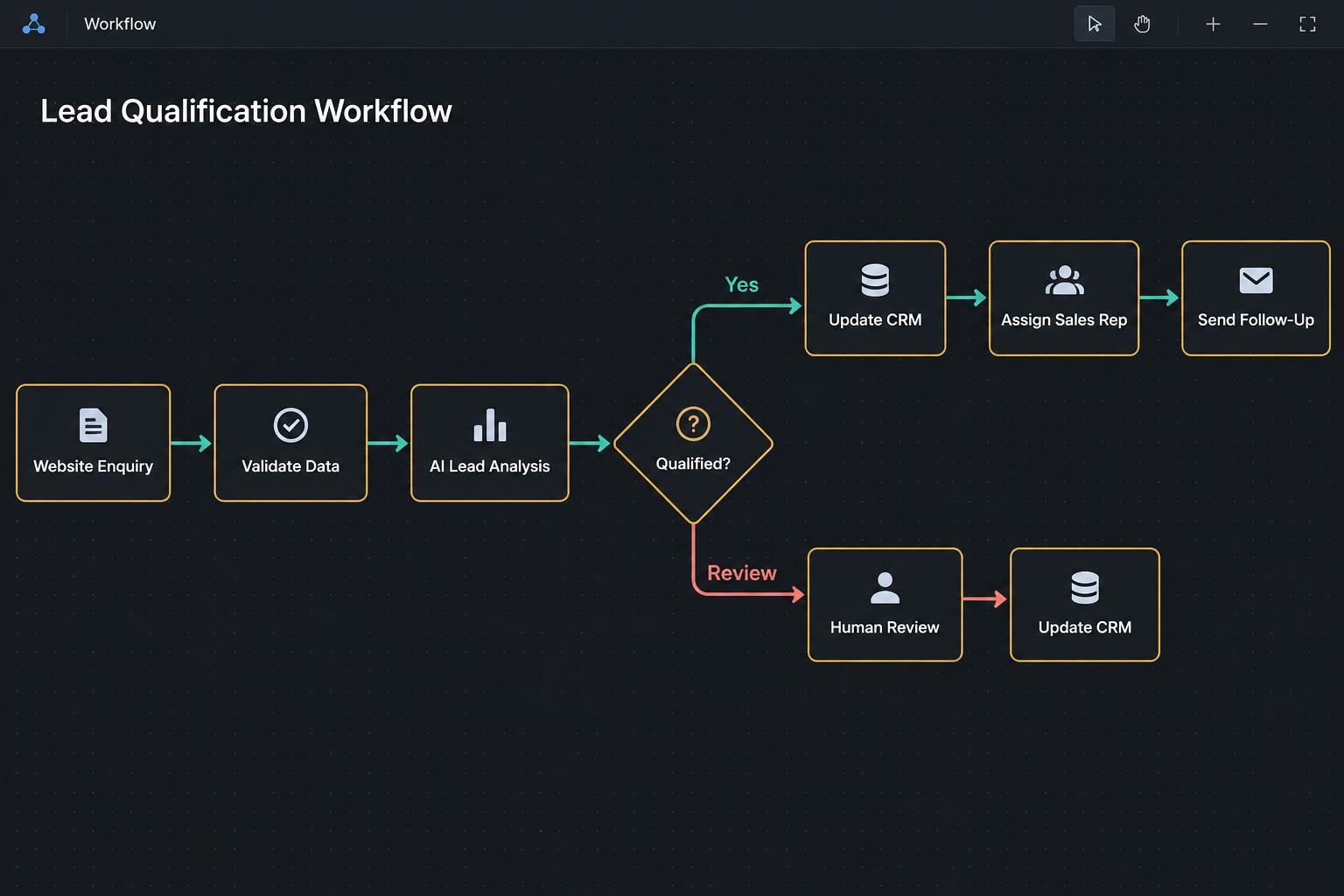
For example, an AI automation workflow can receive a new sales enquiry, interpret the prospect's requirements, evaluate the information against qualification criteria, update the CRM, and notify the appropriate sales representative.
The goal is not simply to introduce AI into a process. It is to design a system that performs specific business tasks reliably and delivers a measurable operational improvement.
What Is an AI Automation Workflow?
An AI automation workflow is a process that combines AI capabilities with traditional automation to complete a series of connected tasks.
It may use AI to:
- Interpret natural language.
- Extract information from documents.
- Classify incoming requests.
- Summarize conversations.
- Retrieve relevant knowledge.
- Recommend or select permitted actions.
Traditional workflow automation then handles activities such as transferring information, applying business rules, updating records, sending notifications, and routing work.
A typical AI automation workflow has four core components:
Trigger: An event that starts the process, such as a new enquiry, incoming email, document upload, or database update.
AI processing: A model interprets information, extracts relevant details, generates a response, or recommends an action.
Automated actions: The workflow updates systems, sends messages, creates records, or triggers the next task.
Human review: Exceptions and high-impact decisions are sent to an employee for review where necessary.
How Is an AI Automation Workflow Different From Traditional Automation?
Traditional automation follows predefined instructions to execute tasks.
An AI automation workflow can include AI operations that interpret information or handle tasks where the next step depends on contextual understanding.
For example, consider a customer enquiry.
A traditional workflow may send every enquiry to the same support queue.
An AI-powered workflow can analyze the message, identify whether it concerns billing, technical support, account access, or another issue, and route it accordingly.
The workflow still uses predefined rules to determine what happens after classification.
AI and traditional automation therefore complement each other.
Benefits of AI Automation Workflows for Businesses
Reduced Manual Work
An AI automation workflow can reduce repetitive activities such as reading messages, extracting information, updating records, and moving data between applications.
Faster Process Execution
Once configured, workflows can perform multiple connected actions without requiring an employee to manually complete every intermediate step.
More Consistent Processing
Business rules can be applied consistently across repeated processes.
Better Information Flow
Integrating multiple applications makes it easier for information to move between departments and systems.
Improved Operational Visibility
Execution logs, status records, and notifications can help employees understand the progress of a process and identify outstanding exceptions.
Scalable Operations
Businesses can handle higher volumes of routine work without necessarily increasing manual effort at the same rate.
How to Design an Effective AI Automation Workflow
Building an AI automation workflow should begin with understanding the process and defining the desired outcome.
Step 1: Identify the Process to Automate
Start by identifying a specific process that involves repetitive work, manual coordination, or information processing.
Examples include:
- Lead qualification and follow-up.
- Customer support ticket handling.
- Invoice processing.
- Document classification.
- Internal reporting.
- Customer onboarding.
Avoid starting with a broad goal such as "automate sales." Choose a specific process with clear boundaries.
Step 2: Map the Existing Process
Document how the process currently works.
Identify:
- What triggers the process.
- What information is required.
- Which applications are involved.
- Who performs each task.
- What decisions are made.
- Where delays occur.
- Which situations require human attention.
This creates a clear picture of what the automation needs to accomplish.
Step 3: Determine Where AI Is Actually Needed
Not every step requires AI.
Use traditional automation for predictable activities such as transferring information, creating records, or sending notifications.
Use AI when the process involves tasks such as interpreting messages, extracting information from documents, summarizing conversations, or classifying unstructured data.
This makes the system more focused and easier to control.
Step 4: Design Workflow Logic and Integrations
Define how information moves between each component.
Determine which applications need to communicate, what data should be transferred, what conditions should be evaluated, and what happens when something goes wrong.
This is where API integrations, webhooks, data transformation, and workflow orchestration become important.
Step 5: Add Human Review and Exception Handling
A reliable workflow should account for situations where automatic processing is unsuitable.
Examples include:
- Missing or conflicting information.
- Uncertain AI classifications.
- Failed system integrations.
- Financial approvals.
- Sensitive customer requests.
- Decisions outside the system's permitted scope.
Define which situations should trigger a retry, clarification request, or human review.
Step 6: Test the Workflow
Test the complete process using realistic data and different scenarios.
Do not test only the ideal path.
Include situations involving missing fields, incorrect inputs, duplicate records, unsuccessful API calls, and unexpected responses from AI components.
Verify that the system handles each situation as intended.
Step 7: Deploy and Monitor
Once the workflow has been tested, deploy it into the appropriate business environment.
Monitor:
- Execution success and failure rates.
- Processing time.
- Manual intervention requirements.
- Data accuracy.
- Exception frequency.
- Operational outcomes.
The workflow should be reviewed and improved as business requirements change.
Example: AI Automation Workflow for Lead Qualification
Consider a company that receives sales enquiries through its website.
Its sales team needs to determine which enquiries match its customer profile before investing time in follow-up.
An AI automation workflow could operate as follows:
| Workflow stage | What happens |
|---|---|
| Lead submission | A prospect submits an enquiry form |
| Data collection | The system captures the prospect's information |
| Information enrichment | Available company information is retrieved |
| AI analysis | The AI interprets the enquiry and identifies the prospect's needs |
| Qualification | The system evaluates the information against business criteria |
| CRM update | The prospect's information and qualification results are recorded |
| Routing | Suitable leads are assigned to the appropriate representative |
| Follow-up | The system initiates the appropriate communication |
| Notification | The sales team receives the relevant information |
The AI handles interpretation and qualification support, while the workflow controls the process and executes the required actions.
Common Problems When Implementing AI Automation Workflows
Automating a Poorly Designed Process
If the existing process contains unnecessary steps or unclear responsibilities, automating it may preserve those problems.
Review and simplify the process before building the system.
Using AI for Tasks That Do Not Need It
Introducing AI into simple, predictable tasks can add complexity without creating additional value.
Use conventional automation where it is sufficient.
Ignoring Data Quality
AI workflows depend on the information they receive from forms, documents, databases, and connected systems.
Poor data quality can affect the entire workflow.
Overlooking Integration Failures
A workflow can fail when an API becomes unavailable, authentication expires, or an external application changes.
Build appropriate monitoring and recovery procedures.
Removing Human Oversight Too Early
Some activities involve financial consequences, sensitive information, or significant business decisions.
Define appropriate approval and escalation requirements before deployment.
How Do You Measure an AI Automation Workflow's Performance?
The appropriate metrics depend on the process being automated.
Useful measurements include:
- Time required to complete the process.
- Number of manual steps removed.
- Employee hours spent on the process.
- Workflow completion rate.
- Data accuracy and error frequency.
- Number of exceptions requiring manual review.
- Cost per processed transaction.
- Customer response or resolution time.
Establish a baseline before implementation so you can compare performance after deployment.
Frequently Asked Questions
What is an example of an AI automation workflow?
An example is a sales qualification workflow that captures website enquiries, analyzes prospect information, scores leads, updates the CRM, and routes qualified opportunities to the sales team.
How do AI automation workflows work?
They combine triggers, AI processing, workflow logic, connected applications, and automated actions to complete a sequence of business tasks.
Do AI automation workflows require coding?
Not always. Some can be built using no-code or low-code platforms. More complex implementations may require JavaScript, APIs, custom software, or specialized integrations.
What is the difference between an AI agent and an AI automation workflow?
An AI agent is a system that can interpret information and select permitted actions to achieve a goal. An AI automation workflow defines the broader process that connects triggers, AI operations, business rules, integrations, and actions. An agent can be one component within a workflow.
Can AI automation workflows work with existing business software?
Yes. They can integrate with existing applications through native connectors, APIs, webhooks, and other supported integration methods.
Build an AI Automation Workflow Around Your Business
An effective AI automation workflow begins with a clear understanding of how work currently gets done.
The right combination of AI, integrations, business logic, and human oversight can turn disconnected manual activities into a coordinated process.
EasyMarketPro designs and builds custom AI automation workflows around business requirements, existing systems, and operational goals.
Tell us about the process you want to improve.
Book a Discovery Call