
Finance Automation
AI Finance Automation: How to Automate Financial Processes and Operations
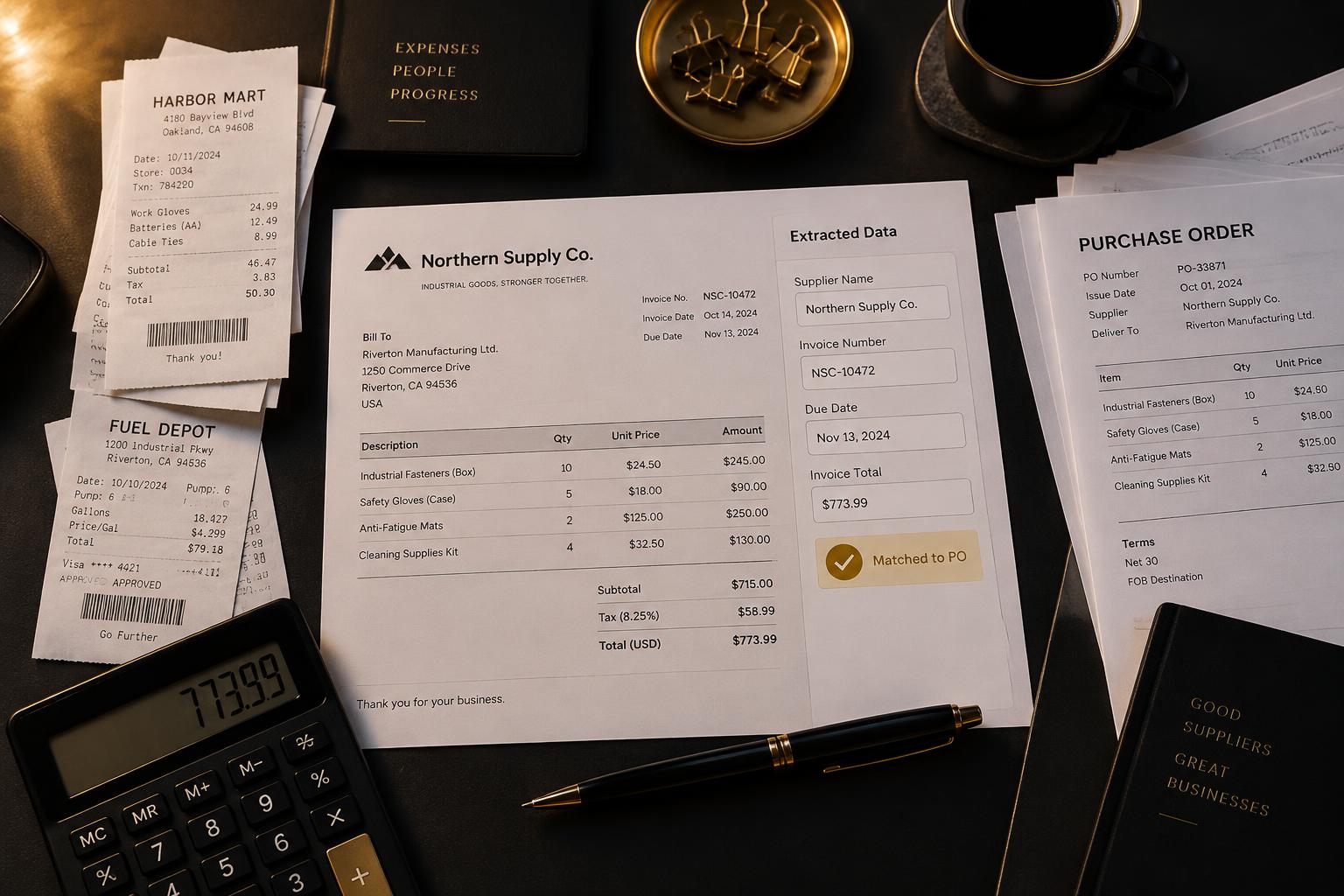
Finance teams handle a wide range of recurring activities, from processing invoices and tracking payments to reviewing expenses, reconciling records, and preparing financial reports.
Although accounting and finance platforms already provide automation features, employees may still spend significant time collecting documents, extracting information, checking records, and moving data between applications.
These manual processes can slow down financial operations and make it harder to manage growing transaction volumes.
AI finance automation uses artificial intelligence and workflow automation to process financial information, coordinate routine tasks, identify exceptions, and support finance operations with less manual effort.
By combining AI with accounting systems, databases, document processing, and business workflows, companies can automate selected parts of their finance operations while maintaining appropriate financial controls.
What Is AI Finance Automation?
AI finance automation is the use of AI-powered systems and automated workflows to handle or assist financial processes.
It can help finance teams interpret documents, extract financial information, classify transactions, match records, prepare reports, and coordinate approval processes.
Common areas include:
- Accounts payable.
- Accounts receivable.
- Invoice processing.
- Expense management.
- Financial document processing.
- Reconciliation support.
- Payment follow-up.
- Financial reporting.
Unlike purely rule-based automation, AI can help interpret information that appears in different formats, such as invoices, receipts, emails, and financial documents.
However, financial automation should not remove the controls required to protect company funds and records.
AI can prepare information, identify discrepancies, and route tasks, while authorised employees retain responsibility for important approvals and financial decisions.
How Does AI Finance Automation Work?
A finance automation workflow typically combines document or data collection, AI processing, validation, business rules, and system updates.
1. Financial Data Collection
The system receives information from relevant sources.
These may include:
- Email attachments.
- Uploaded invoices.
- Expense receipts.
- Accounting software.
- ERP systems.
- Supplier records.
- Bank transaction feeds.
- Internal financial databases.
2. AI-Powered Information Extraction
AI can interpret financial documents and extract relevant information.
For example, an invoice-processing system may identify:
- Supplier name.
- Invoice number.
- Invoice date.
- Due date.
- Purchase order reference.
- Line items.
- Tax information.
- Invoice total.
This is particularly useful when businesses receive documents with different layouts and formats.
3. Validation and Matching
The extracted information can be checked against existing business records and defined rules.
For example, the system can compare an invoice with its purchase order and relevant delivery information.
Missing information, discrepancies, duplicate records, and unusual transactions can be flagged for review.
4. Approval and Routing
Once the required checks have been performed, the workflow can route the document or transaction to the appropriate person.
Approval requirements may depend on factors such as transaction amount, department, supplier, or company policy.
5. Financial System Updates
After the required validation and approvals, the workflow can prepare or perform authorised updates in the accounting or ERP system.
The system should maintain appropriate records of what was processed, which checks were performed, and who approved consequential actions.
Practical Use Cases for AI Finance Automation
1. Automated Invoice Processing
Invoice processing is one of the most practical applications of AI in finance.
Finance employees often receive invoices through email or document uploads. They need to identify the supplier, extract relevant information, check the details, and prepare the invoice for approval.
An AI-powered invoice workflow can:
- Capture incoming invoices.
- Identify the document type.
- Extract invoice information.
- Validate required fields.
- Compare details against purchase orders.
- Flag missing or inconsistent information.
- Route invoices for approval.
- Update the accounting system after approval.
This reduces repetitive data entry and supports a more organised accounts payable process.
Importantly, extracting invoice information does not mean the system should automatically authorise payment.
2. Accounts Payable Automation
Accounts payable involves managing the amounts a business owes its suppliers.
AI and workflow automation can assist with:
- Invoice capture.
- Supplier information extraction.
- Purchase order matching.
- Invoice classification.
- Approval routing.
- Duplicate invoice detection.
- Payment status updates.
- Supplier communication preparation.
For example, an automated workflow can detect that an invoice is missing a purchase order reference and send it to the relevant employee for clarification.
This helps finance teams focus on exceptions rather than manually reviewing every document from the beginning.
3. Accounts Receivable and Payment Follow-Up
Accounts receivable involves tracking payments owed to the business by customers.
AI automation can help manage the administrative work associated with collecting outstanding payments.
A system could:
- Retrieve outstanding invoice records.
- Identify overdue accounts.
- Prepare payment reminder messages.
- Schedule reminders based on company rules.
- Record communication history.
- Update customer payment status.
- Notify employees about disputed or unusual accounts.
The workflow should respect approved communication policies and account-specific arrangements.
For sensitive disputes or payment arrangements, human review may be appropriate before communication is sent.
4. Expense Processing
Businesses receive expense claims and receipts from employees, contractors, and other authorised parties.
AI can extract information from receipts, classify expenses, identify missing fields, and compare claims against predefined expense policies.
An expense automation workflow might:
- Receive an expense receipt.
- Extract the date, supplier, amount, and currency.
- Identify the expense category.
- Check required information.
- Flag potential policy exceptions.
- Route the claim for approval.
- Record the approved expense in the accounting system.
This helps reduce manual entry and supports more consistent expense handling.
5. Reconciliation Support
Financial reconciliation involves comparing records from different sources to identify differences and confirm that transactions have been recorded correctly.
AI automation can assist by organising transaction information, identifying potential matches, and flagging discrepancies.
For example, a workflow might compare:
- Bank transaction records.
- Accounting ledger entries.
- Payment processor records.
- Customer payment records.
Transactions that meet the defined matching criteria can be identified for review or processed through controlled reconciliation rules.
Unmatched transactions and unusual differences should be routed to finance staff rather than forced into an incorrect match.
6. Financial Document Processing
Finance departments handle more than invoices and receipts.
They may also receive purchase orders, supplier documents, financial statements, expense reports, and other records.
AI can identify document types, extract relevant information, classify files, and route them to the appropriate departments or storage systems.
This can reduce time spent organising financial information across multiple systems.
7. Financial Reporting and Data Collection
Preparing reports often involves collecting information from different applications and organising it into a consistent format.
Automation can retrieve approved data, consolidate records, prepare report drafts, and notify finance teams when information is missing.
AI can also help summarise financial data and explain selected trends.
However, financial calculations should be based on validated data and controlled calculation logic. AI-generated summaries should not replace verified financial statements or authorised reporting processes.
Example: How an AI Invoice Processing Workflow Works
Consider a company that receives hundreds of supplier invoices each month.
Employees currently open each email, download the attachment, extract the invoice details, check the purchase order, enter the information into the accounting system, and send the document for approval.
A custom invoice-processing workflow could coordinate these steps:
- A new invoice arrives through a designated email address.
- The system extracts the attachment.
- AI identifies the invoice and extracts the required fields.
- The system checks the supplier and invoice details against available records.
- Business rules validate required information and identify potential duplicates.
- The workflow compares the invoice with the relevant purchase order and supporting records.
- Incomplete or inconsistent invoices are routed for review.
- Validated invoices are submitted through the appropriate approval process.
- After approval, the workflow updates the accounting system.
- The system records the processing outcome for future reference.
This reduces the amount of repetitive document handling while retaining human control over financial approvals.
What Are the Benefits of AI Finance Automation?
Reduced manual data entry: AI can extract and organise information from financial documents, reducing repetitive typing and data transfer.
Faster document processing: Automated workflows can move financial documents through defined steps without relying entirely on manual coordination.
Improved exception identification: AI can help identify missing information, inconsistent records, and potential duplicates.
More organised financial operations: Workflows can standardise how documents are received, validated, routed, and stored.
Better process visibility: Automated logs and status updates can make it easier to understand where transactions are within the approval process.
Greater operational capacity: Finance teams can spend less time handling routine administrative work and more time reviewing exceptions and supporting business decisions.
The actual benefits depend on document quality, integration reliability, transaction volume, existing controls, and the design of the workflow.
Security and Controls in AI Finance Automation
Financial information requires careful handling.
An automation system should be designed with security and accountability in mind.
Important considerations include:
- Restricting access to financial information.
- Applying role-based permissions.
- Keeping audit records of system activity.
- Validating extracted information before posting.
- Requiring approval for sensitive transactions.
- Preventing unauthorised payment instructions.
- Handling exceptions through defined processes.
- Protecting financial documents and customer information.
A useful principle is to separate information processing from financial authorisation.
AI may prepare an invoice, recommend a category, or identify a discrepancy. An authorised employee or controlled business process should retain the required approval authority.
How to Implement AI Finance Automation
Step 1: Identify Repetitive Finance Processes
Review how the finance team handles invoices, expense claims, payment follow-ups, reconciliation, and reporting.
Identify where manual document handling and data entry create delays.
Step 2: Choose a Suitable Starting Point
Start with a specific process, such as invoice extraction, expense classification, or payment reminder preparation.
Step 3: Assess Data and Integrations
Identify which documents, accounting platforms, ERP systems, and internal records are required.
Confirm that the applications provide suitable integration methods and access permissions.
Step 4: Define Validation and Approval Rules
Establish how transactions should be checked, what constitutes an exception, and which actions require employee approval.
Step 5: Test With Realistic Financial Documents
Test different document layouts, missing fields, duplicate records, currency formats, and inconsistent information.
Financial workflows should be tested carefully before being used in production.
Step 6: Monitor and Improve
Track processing accuracy, exception rates, failed integrations, and employee review requirements.
Use these findings to improve the workflow without weakening financial controls.
How Do You Measure AI Finance Automation Performance?
Useful metrics include:
| Finance objective | Metric |
|---|---|
| Reduce invoice handling effort | Average employee time per invoice |
| Improve processing speed | Invoice processing cycle time |
| Reduce manual correction | Data correction rate |
| Improve automation coverage | Percentage of transactions processed without manual data entry |
| Improve exception handling | Exception rate and resolution time |
| Improve accounts receivable | Days sales outstanding and overdue invoice levels |
| Control operating costs | Cost per processed transaction |
Metrics should reflect the actual process being automated. A high automation rate is not useful if errors increase or employees have to spend more time correcting results.
Frequently Asked Questions
What is AI finance automation?
AI finance automation uses artificial intelligence and automated workflows to process financial information, extract data, classify records, identify discrepancies, route transactions, and support routine finance operations.
Can AI automate invoice processing?
Yes. AI can help capture invoices, extract details, identify document types, validate fields, match records, and route invoices for approval. Payment authorisation should remain subject to the company's financial controls.
Can AI automate accounts payable?
AI can support several accounts payable activities, including invoice processing, supplier data extraction, purchase order matching, duplicate detection, and approval routing.
Can AI automate bank reconciliation?
AI can assist with organising bank and accounting records, identifying potential matches, and flagging discrepancies. Reconciliation rules and final review should be designed around the company's accounting requirements.
Is AI finance automation suitable for small businesses?
Yes. Small businesses may benefit from automating recurring processes such as invoice handling, expense processing, and payment reminders. The solution should be proportionate to transaction volume, existing software, and available budget.
Does AI replace accounting software?
No. AI automation can complement existing accounting and ERP systems by connecting processes and reducing manual work. These systems should continue to serve as the authorised sources of financial records.
Final Thoughts
AI finance automation is not about giving AI unrestricted control over financial operations.
It is about using AI to handle repetitive information processing, coordinate workflows, identify exceptions, and reduce manual administrative effort while retaining the financial controls businesses depend on.
At EasyMarketPro, we design custom AI automation systems that connect financial processes with existing business software, helping organisations streamline document handling, data processing, and operational workflows.
Discuss your finance workflow with EasyMarketPro to explore where AI automation could improve your financial operations.
Book a Discovery Call